
“Your IT department or website hosting company can help keep you safe. But that should only be part of your website protection plan. Your employees are part of the equation.”
If the recent revelation that 70% of websites have a flaw that makes them easier to hack doesn’t worry you, it should. The number of cyber attacks on your website will grow exponentially in the near future. Hopefully, the “good guys” can stay ahead of these bad actors and limit the impact. But the good guys can only do so much.
Your IT department or website hosting company can help you keep you safe. But that should only be part of your website protection plan. Your employees are part of the equation. Hackers exploit busy people with requests that seem harmless. Most employees are simply trying to do their work. Clear procedures and a few practical habits can help your team recognize trouble before an innocent mistake creates a bigger problem.
At Power Marketing, we’ve seen our share of employee-caused hacks, especially in the last six months. Here are five common employee mistakes that put your business at risk, along with steps to correct or prevent them.
We’re all guilty of this. The average person has more than a dozen passwords for work-related activities. No one can remember all those passwords, and password managers can be annoying. Typically, users sign up for a service or free trial unrelated to work and reuse the password. Once the password is exposed, hackers will try it on company emails, websites, and payment systems.
At a minimum, do not use the same passwords for personal and business accounts. Each business account should have a unique password. Using a password manager like LastPass creates unique passwords for each account and auto-fills them when you log in. If you choose to create your own passwords, the password manager can notify you of accounts with duplicate passwords.
Always use two-factor authentication on all of your accounts. So, if your password is stolen, it’s not useful since the hacker would need access to your phone, email, or authenticator app.
The scam is called Click(Fix). Our team saw this in the most recent hack, where attackers used it to compromise multiple people. Users received a fake message from Cloudflare: “Verify you are human.”
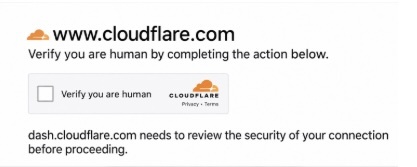
After clicking on the prompt, the user is either prompted to download a file or run a command. Once the file is downloaded or the command is executed, the malware steals website login information from an employee who has access.
An attacker could then use that access to enter the company website and make changes, access email settings, or even payment systems.
Ideally, if employees receive the fake message, they should take a screenshot of the message and contact their IT or website security providers. Also, employees should never download commands onto their computers without prior approval from IT or website security.
An unexpected résumé, invoice, or browser update could contain malware. This is typically referred to as phishing. It can also be called spear phishing if your company is specifically targeted.
This is another example of how cyber criminals can take advantage of busy workers, hoping they will not notice the dangerous email. The email may look something like:
Subject: Updated Bid — Please Review Before Friday
“Hi Jennifer, attached is our revised bid for the upcoming warehouse project. Please review the updated pricing before Friday and get back to me with questions.”
Here’s how the fake email works:
Before opening an unexpected attachment, check the email address to make sure it matches the company in the email. Reply to the sender and confirm the content of the email. If you really want to take your security up a notch, make sure your employees only receive bids, resumes, etc., through a secure portal.
Okay, this is another one we’ve all probably done before. It saves time when multiple people share a website login. One shared website login may seem convenient when several people need access to edit text, add images, or update SEO.
But having multiple people using the same account creates two issues.
Make separate accounts for each person who needs to work on the website. Keep a user list, remove accounts for former employees, and establish a process for when individuals leave your company. Individual accounts make access easier to manage and help security track issues through backend activity records.
In the WordPress backend, there are three access levels: Administrator/Admin, Editor, and Subscriber. Most website Content Management Systems (CMS) have similar access levels.
The Admin is the top level, and more than one person may be given that designation. In short, the Admin can do any work on the website: change settings, edit, add/remove users, delete pages, upload files, take down the website, etc.
Editor access allows the employee to change content, add images, add/remove posts, and manage comments.
Subscribers are limited to reviewing content, images, and settings but cannot make any changes.
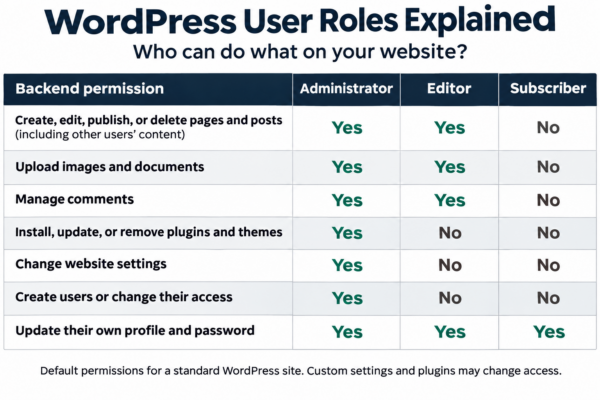
Unfortunately, many companies have multiple Administrators/Admins set up on their website. So, if login information is compromised, the hacker can pretty much take down the website. If the hacker gets access to an Editor’s login, they can only change information, change images, and delete/add pages or posts. If the Subscriber account is compromised, the hacker can’t make changes.
Review each person’s website access regularly. A person who makes content updates or adds images should only be given Editor access. Novices or interns should have only Subscriber access. Limit Administrator/Admin access to users who make major changes to the website, such as updating code, fixing broken links, etc.
Almost everyone has fallen for a malware scam at some point. Your employees need to feel safe when asking questions about website security. It’s extremely important that they are comfortable reporting any mistake they’ve made that may have exposed their computer or company websites. If someone opens a suspicious file or follows an unusual prompt, quick reporting gives your technical team a better chance to limit the damage.
Training employees with clear instructions and making information about different types of hacks easy to access can save you from big headaches.
As I noted in my last blog about website security issues, there have been numerous cybersecurity attacks against manufacturing businesses. If you run a construction company, a remodeling business, or a logistics operation, you’re also at risk. No matter your industry, you should take website security just as seriously as you do the physical security of your building and operations.
If you would like a free security analysis of your website, contact us at Power Marketing or call me at 615-257-0057.
For more than 15 years, Scott Piper has helped construction, manufacturing, and logistics companies reach the right customers and grow their businesses. As President of Power Marketing, Scott works directly with clients on website strategy, SEO, AI search visibility, and online advertising. He strives to build a personal connection with his clients in an increasingly automated world. A graduate of the University of Tennessee, Scott has lived in Nashville since 1998.
Want to learn more about this Power Marketing blog topic? Here are some helpful online resources to get you started.